A Shopify home page that sells, top to bottom.
Most Shopify home pages lose sales to clutter, not bad products. Here are the 11 sections that convert, in order, and what to delete from your theme today.
Most Shopify stores don't have a product problem. They have a home page problem. The theme came with fourteen sections, every one of them got filled with something, and now a first-time visitor has to scroll past a slideshow, a brand story, and an Instagram grid before they see a single thing they can buy.
A home page that converts is closer to a well-run shop floor than a magazine. It tells people what you sell, shows them the good stuff, answers the questions that stop them buying, and gets out of the way. Here's the layout we build from — eleven sections, in this order, and a list of what to cut.
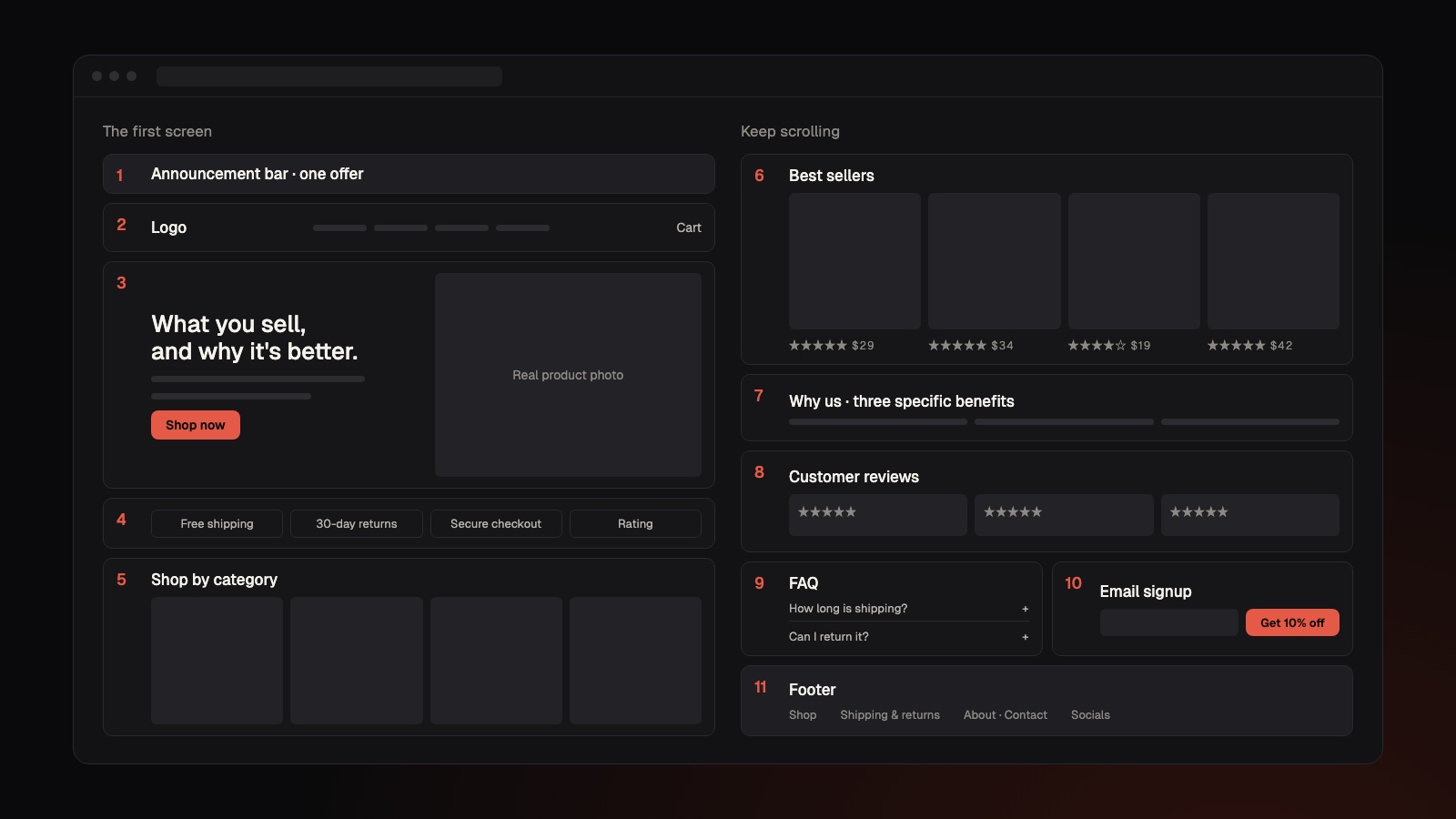
01 · Win the first screen
Everything a shopper sees before they scroll is doing the heavy lifting. Four sections live here, and each one should be almost boring in how clear it is.
- Announcement bar — one line, one offer. Your free shipping threshold or the promo that's actually running. Not three rotating messages.
- Header — logo, four to six menu links, search, and cart. Everything else belongs in the footer.
- Hero — say what you sell and why it's better, show the real product, and give one button. "Shop now" is fine. Two buttons is a coin toss.
- Trust strip — three or four short promises right under the hero: shipping, returns, secure checkout, your rating.
"Welcome to our store" is the most expensive headline on Shopify. Say what you sell instead.
The hero is where most stores go wrong. A lifestyle shot with a vague line like "Elevate your everyday" makes a stranger work to figure out what you sell. A clear photo of the product with a headline that names it and one reason it's better lets them decide in seconds whether they're in the right place.
02 · Help them pick something
Once someone decides to stay, the next job is getting them to a product page fast. Two sections do that.
- Shop by category — three or four collection tiles with real photos. If you have fewer than about ten products, skip it and go straight to best sellers.
- Best sellers — four to eight products that already sell. Photo, name, price, and star rating on every card. New arrivals can wait; proven products convert.
Put the price on the card. Hiding it until the product page doesn't create intrigue, it creates a click people resent — or one they don't bother making.
03 · Answer the doubts before checkout
Shoppers who scroll this far are interested but not sold. The middle of the page exists to remove the reasons they'd leave.
- Why us — three specific benefits. "Made in small batches in Ohio" beats "High quality" every time, because only one of them could be checked.
- Customer reviews — real names, real words, photos if you have them. Three great reviews are plenty; a carousel of forty just trains people to skip it.
- FAQ — four to six questions you actually get asked: shipping time, returns, sizing. If your inbox answers the same question weekly, it goes here.
Specific and small reads as trustworthy. Big and vague reads as a dropshipper.
04 · Keep the ones who aren't ready
Most first visits don't end in a sale, and that's normal. The bottom of the page is for making sure they come back.
- Email signup — give people a reason to join, like 10% off their first order. "Subscribe to our newsletter" gets ignored because it only benefits you.
- Footer — policies, contact, socials, and the link to your About page. This is where the nice-to-have stuff lives, so the rest of the page doesn't have to carry it.
05 · What to cut today
A better home page is usually a shorter one. These are the things we remove from almost every Shopify store we audit — each one either slows the page down, splits attention, or chips away at trust.
- "About us" sections on the home page — nobody cares yet. Save your story for the About page, where the people who do care will read it.
- Auto-rotating slideshows — nobody waits for slide three. Pick your strongest message and make it the only hero.
- Pop-ups on page load — wait at least ten seconds, or until someone scrolls. Interrupting a visitor before they've seen anything is a fast way to lose them.
- Three buttons in the hero — one main action per section.
- Instagram feed widgets — they're slow, and they send people off your site to somewhere with infinite distractions.
- Fake countdown timers — customers can tell, and once they spot one, they doubt everything else on the page.
- Leftover theme demo content — any section without real content gets deleted, not filled with filler.
- Too many apps and badges — every one adds weight to the page, and a slow store loses shoppers before it loads.
- Stock photos of your product category — real phone shots of your actual product beat polished stock every time.
06 · The ten-minute check
Open your store on your phone, not your laptop — that's where most of your shoppers are. Scroll the home page top to bottom with the list above next to you. Tick off each of the eleven sections you have, cross out anything from the cut list you find, and note what's out of order.
Then hand your phone to someone who's never seen the store and ask them what you sell and what they'd buy first. If they hesitate on either question, start with the hero and the best sellers — that's where the fastest wins almost always are.
07 · Quick answers
- How many sections should a Shopify home page have? Around eleven, each with one job: announcement bar, header, hero, trust strip, categories, best sellers, why us, reviews, FAQ, email signup and footer.
- Should I use a slideshow on my Shopify home page? No — most visitors never see past the first slide. One strong, static hero with a single button converts better and loads faster.
- Do I need a shop-by-category section? Only if you have more than about ten products. Smaller stores should lead with best sellers instead.
- What's the best email signup offer for a Shopify store? A clear first-order discount, like 10% off, works better than a generic newsletter because it gives the shopper a reason to join.
- Do Shopify apps slow down my store? Often, yes — each app can add scripts to every page. Remove any app or badge you can't point to a clear benefit from.
Want us to do it instead?
Site, SEO, ads, and creative from one team that stays after launch. A flat price up front and a real launch date.